Showing posts with label ipads. Show all posts

02 September 2020

Use an iPad or iPhone For a Whiteboard in Your ZOOM Virtual Classroom

 Are you teaching from home while your document camera is at school? Trying to use a whiteboard behind you but worried that the text is too small for kids to read? Just wish you had more functionality for your whiteboard, like bringing in PDFs to annotate in your meeting?

If you have an iPhone or an iPad, you can share screen in your ZOOM meeting and connect your Apple device to the meeting! 

As I was starting to write this post, I actually remembered ZOOM has had this functionality for at least 9 years! When I was first given an iPad2 by my district in 2011 I used to connect my iPad to my desktop computer so I could go through examples while I stood out of the way of my students, in the back of the room!

Worried your iPad/iPhone might be too old? This screenshare feature works with any device that can run the ZOOM app - my iPad mini is at least 7 years old! 

Here's the tutorial:


07 August 2020

This Is Why Kids Need Music Education...

 ...so they can grow up to be adults that know how to read and/or play music!


This is just a little story of how being able to read music notes and pulling up an online keyboard on my iPad helped my daughter get through her guitar frustration today!

Outtakes


05 June 2015

Using Visual Notes for Memory and Understanding

Are you an doodler? Associating notes and terms with images is helpful for recalling information later, so doodling (or finding images that relate and then pasting in) is a good strategy for taking something mundane like note-taking and creating an "experience" that will be easier to call upon during test time. I still remember the tank I drew with icicles hanging from it in 10th grade on my Cold War notes.


This brings me to today's use of visual notes. As much as it pains me to say, "victory" on the ACT does not always go to the "smartest" students, but instead, to those who can best play the game. In a bubble, I'd much rather teach math concepts and skills, but when it comes to gaming the ACT, sometimes those get in the way.

This is best exemplified in my experience from my 2 experiences taking the ACT as a student. The first time, I had a TI-83 at my side, checking every graph and solution I could, searching for just the right formula. I didn't finish that section - I don't even remember being that close. The second time I took the ACT, I did not have the graphing calculator (I have no idea where the graphing calculator I'd been using went) - I didn't even have a scientific calculator! I told my dad on the way to the test that I needed to get a calculator, so we stopped at a supermarket, bought a 2 dollar four function calculator. The magic of my 2 dollar calculator test was that I HAD to skip around to the things I could do easiest. I was much more agile in my thinking, skipped around more quickly when I felt stuck, and actually did 5 points higher that time. My "knowledge" got in the way the first time from me showing what I definitely knew, and there were probably some questions I could have done that I never got to.

I found a list of strategies for each section of the ACT on sparknotes.com for my students and I've tasked them to make a "poster" for each section and the included strategies. My skill set and interest leans toward illustrating in any whiteboard or drawing app, but I left open the option for using the PicCollage app to bring in images and text or Haiku Deck to make a slide show with an image for each strategy.

Here's the example I created using the Paper app based on tips from this video that I showed earlier in class:

Here's a preliminary student example:
My favorite part of this one is the crossed arms emoji for "eliminate answers". :)
More visual notes resources:
6 Apps To Visualize Notes on iPad
Sketchnotes and Visual Thinking Note-taking - This page summarizes and links to many OTHER resources
Show with Media: Visual Note-taking

Happy note-taking!

18 March 2015

Do Your Students DESERVE Technology?

"Well, its they fault for having iPads..."


This was a students' response a couple weeks ago when I told everyone we were putting their project on hiatus because someone in their class walked out with an iPad yesterday. (The day after someone walked out with the class fish to be "funny.")

"The school should have known they'd be stolen - this is the hood."

I'm not oblivious to my own white privilege, and my school is definitely not Pleasantville High, but to describe our setting as "the hood" is laughable at best and disrespectful to the students in cities who have to go to schools across the country where their safety IS obviously in question.

But... maybe my school is more authentically ghetto than I thought. In a real, Webster's Dictionary kind of way, many of  my students are at least CULTURALLY isolated and trapped. When I announced their class would be going back to worksheets, there were some kids who started making contingency plans to finish their project work after school or on their cellphones, but no one really expressed the same outrage at the injustice I was about to enact on this class as I was feeling myself. I wonder how aware they are of the creative, cool, relevant projects kids with more access to technology are doing every day in other schools?

Some of my students may have even been relieved - completing a worksheet requires much less of them than a student-paced, open-ended statistics project like we've been doing. Worksheets eventually go away because the teacher moves on to the next teacher-centered, teacher-directed activity. The sheeple can follow along.


When relevance is a CLASSROOM-SPECIFIC focus, it sends the message organizationally that its only something that happens in so-and-so's class. Something THAT TEACHER is doing extra. (I had a kid tell me today after he told me he couldn't enter his answers into a Google Form that he was going to just go to credit recovery so he could get a math class that doesn't use technology. His teacher last semester that he failed with was heavy on flipping the class and using Study Island for some assessment.) When student-centered, relevance-seeking technology use is only in pockets, students can escape (and slip through the cracks). Students can blame THAT TEACHER on bad experiences. When relevance is a school-level or district-level emphasis, it starts to shift the CULTURE, which can then change the students' mindsets.

So what did do the next day? I kept the iPads locked up for that class for several more days after the fact, but they're back out now. I don't want to manage two different lesson plans for the same course, nor do can I bear intentionally making the decision to leave the iPads in the cart. I believe the only thing to fight my students' ignorance is with knowledge and exposure, and the only way to ever know and expect better is to see and experience better. 

26 August 2014

Create Digital Manipulatives with PicCollage App

Searching for a fun way to enrich my students who had already watched and accounted for the videos for today's lesson, I decided to have them create and use manipulatives to model the addition and subtraction of integers that I had presented in my flipping videos.

My first decision was to just have them use paper, but with other kids in the room catching up on the videos on the class iPads, that almost seemed like a PUNISHMENT. "Good job doing your homework and getting ahead. Now give me back the technology - you can cut paper squares." Not exactly the engaging environment I was hoping to create. While rethinking it during my prep, I opened my iPad just to look through my apps to see which of them might give me some of the create-a-shape-and-then-move-it-around functionality I was seeking.

I settled on the app PicCollage (iOS | Android), which I previously used last year to have students construct a Frayer Model for our exponent rules.

Here are some student examples. Taco vs. Nachos was my favorite. :)
That was "-6 + 12 =" in the blue text, in case you're thinking this kid was as lost I was first thinking when I looked at it. :)
This was is also -6 + 12
7 + (-12)
The real winner was when the creator of smileys vs slushies above used HIS OWN MODEL to help out the kid next to him who was a little confused on how to use the model. Student win!

07 June 2014

Traditional Textbooks Are Holding Back Your Students' Vocabularies

Do you use the dictionary tool embedded in the tools in your favorite eReader or browser? What about your students? Once your students are proficiently reading at a middle school level they probably aren't likely to run across (many) unknown words in popular fiction, but what about content specific words in textbooks or course specific literature like Shakespeare or Hawthorne?

Remembering from my own experience, your students traditionally have three choices (and these are still advocated, I know) - keep a paper dictionary at your desk/in your backpack to look up words whenever necessary, attempt to use context clues to get an idea, or skip over it and miss out on comprehension of the text.

I've got a lot of respect for students willing to keep that dictionary with them (or even willing to reference a standalone app), but why are we making it so hard on our students (or yourself)? When you give your students ebooks and web resources to read, definitions are a highlight-and-tap away. Your definition comes on-screen and in context.
Kindle for iOS 
IBooks
Safari for iOS

Imagine how you could unlock your students' potential to learn through reading if they weren't frequently skipping new words (or skipping the reading altogether because it seems insurmountable).

Ready to take the next step?
Your district may not have a license for the corresponding ebook to your text, but you can use these tools to get your students access to alternative texts they could use in class or on their own devices.

CK-12
You can find a free CK-12 ebook in iBooks and the Kindle store for many go your core subject needs (Algebra, Geometry, American History, Biology, Chemistry, etc.) 

CK-12 Flexbook
On the website from the resource above comes a related, customizable tool. I've had these on my class iPads for a couple years. I like them because you can create/compile your own text, or use one that another teacher has already made public. I usually also post a download link on my class website for students' personal downloading pleasure.perfectly formatted 

iBooks Author 
This Mac app allows you to bring in text, images, and video to create an ebook perfectly formatted for iBooks (although it would still work in other ereaders, as well.) you can share your books created in iBooks Author just as I do with my Flexbooks from CK-12. 

Someone in your social network. 
Fellow AP Stats teacher, Julie Kindred (@jkindred13), has made most (if not all) of a stats book in iBooks Author and was willing to share her treasure with me. Maybe you are as fortunate as I am and have someone in your network who has done the same for your needs. Or you and a few friends could collaborate on one!

27 February 2014

Flip Student Project Presentations w/ iOS App Touchcast


I asked a few of my colleagues in the math office about any the reservations they had about having their students make class presentations.
"I think I'm always disappointed with the end product."
"You do it for too long, and they get bored. They don't listen to each other."
"I worry that so many kids are off task and not engaged when the other students are presenting."
When I asked one of them how many days they usually allocate to project completion IN CLASS, her response was, "Days?! How about weeks! If you don't give more time, even those honors kids won't do as well because they're so stressed out about their other classes."

Needless to say, taking out time for project presentations is not something we usually get warm fuzzies about.

THE PROJECT
At the end of every chapter in AP Stats, I usually alternate between summative exams and summative projects. The exams are good because they get more practice preparing for the AP exam, but I think the learning is usually more evident (or lack thereof), and more authentic.

We usually write papers to practice formal, technical writing and integrating math with charts and text, but I was excited about using the Touchcast app recently for my flipped lessons in another class, so I thought I'd have my students kick the tires.

The students had a choice between two projects requiring similar skills, "A Fair Coin," or "Airline Overbooking."

THE PROCESS
The most I usually commit to these projects is one day to allow for questions and clarifications, but there was an obvious need for more support on this project (especially because students under-performed last year), so gave a day for stats work and a day for putting together the slides.

After the slideshow was together, students copied the share link and inserted it as an interactive app in the iOS broadcasting app, Touchcast.

RESULTS
Students were really nervous about being on camera and talking about their slideshows. In a good way, I think. I enjoyed the creative tweaks many of them inserted in their presentation, risks that I think they may have been less likely to take if they were up in front of the room. (even though they knew I would be sharing their videos).

Getting in Touchcast took about a day and a half, but it was time we would have taken any to present, and using Touchcast, everyone was ON TASK because they were making their videos at the same time.


OTHER WAYS TO USE IN YOUR CLASS
  • Students create a current events broadcast for a social studies class
  • Adding in a browser-based whiteboard (like Twiddla) and having students create tutorial videos
  • Students discuss themes of a piece of literature
  • Students create a news broadcast about historical events
  • Demonstrate a procedure for a science experiment
  • Present and critique a work of art or song

13 January 2014

Podcasts in the Classroom for Relevant, Subject-Specific Content


If you only use your smartphone or tablet for playing games, taking pictures, social media, listening to music, or ::gasp:: communicating, you're missing out on great opportunities to immerse yourself in easily-digestible academic content that will probably make you smarter (and more interesting) :)

If you've ever listened to an audiobook, you understand how convenient podcasts can be in "reading" while you perform other tasks, like driving. My wife and I got hooked on Freakonomics one road trip when I checked out the authors' second audio book, Super Freakonomics, from our local library.

The two Freakonomics books, documentary film and the companion blog and podcast is not only about economics. While co-author Steven D Levitt of the University of Chicago IS an accomplished economist, I'd more likely describe Freakonomics as an exploration in the use of data and statistical methodology to study or improve anything.

The consequence of the wide-range of subjects addressed in the Freakonomics podcasts is that you can quite easily find one that piques your particular niche of interest. Here's a list of topics just from the last few months:

Are We Ready to Legalize Marijuana?
What is the Best Exercise?
The Pope's Recent Critique on Capitalism
Are Gay Men Really Rich?
Fighting Poverty with Actual Evidence
For NBA Hopefuls, Zip Code Matters
Who Runs the Internet?

They've also done work on the NFL and sumo-wrestling. :)
But Freakonomics is just the tip of the iceberg! Here's a list of 9 more educational podcasts to share with your students for reflection, introduction, or enrichment

TEDTalks Audio - TED conferences are places to share recent research or discoveries in short, energetic presentations, usually shorter than 20 minutes.
Radiolab - Natural Sciences - Radiolab is a show about curiosity. Where sound illuminates ideas, and the boundaries blur between science, philosophy, and human experience.
CNN Student News
GrammarGirl - Quick and Dirty Tips
Coffee Break Spanish and French
The Math Dude
60 Second Civics
Stuff You Missed in History Class


I'll be using a Freakonomics podcast that I heard over Thanksgiving Break with my AP Stats class to introduce their capstone project for the semester- developing a statistical inference experiment to answer any question they want. I'm hoping by broadening their statistical exposure beyond politics and sports will help them be more creative in their experiment-dreaming.

The students will be assigned the Poverty podcast linked above and given several question prompts to respond to - about half of which are about the actual content of the podcast and half more about reflecting on possible topics for the capstone project in May.

Here's a link to the assignment.
"The Relevance of Statistical Work"


29 December 2013

Don't Give Up on Manipulatives!

Literally out of my daughter's mouth -

"Yay! I get to learn my shapes!"


I have a pretty cool app on my iPad for ages 2-8 called Agnitus which the kids play from time to time that has practice in colors, shapes, foods, and more. I like it because it has many free games, sends you progress updates on your kids' learning, but I think sometimes my daughter messes up on purpose. :)


This ad on YouTube even claims its great for the kid who wants to touch everything, which certainly describes my boy.


My kids loves their Kindle time as much as the next, but their kinesthetic learning styles demand tactile experiences that a tablet (as much as it improves the mouse) cannot provide as well as tangible, spatial things.
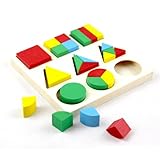
Montessori Wooden Shape Board, Fraction Sorter on Amazon
I'm often quick to disdain physical manipulatives because they're low-tech, take up space, and often expensive, but I'm its important to remember that (especially with young learners) many kids need learning experiences to be as concrete as possible. Although the fraction blocks above still just represent other things, the kids enjoy puzzle toys like this.

I don't want to condone educational hoarding, but don't throw out the old manipulatives with the bath water when you get that iPad cart.

26 December 2013

Getting Google Forms to your Students

I've seen (and done) several trainings and presentations on the power of using Google Forms for rubrics, quizzes, and other assessment, but how to get said Forms to your STUDENTS is an important aspect of the workflow that often gets overlooked or de-emphasized in the course of the training.

WHY DOES IT MATTER?
You can have the greatest Google form/survey in the world, but if you cannot get it yo your audience/students, the form is worthless. When you're using Forms within your Google Apps domain (with other teachers/staff at your school/district), it can be as simple as emailing the live form to everyone on that domain, but the access gets more complicated when students will be using their own Google accounts (or none at all).

WHAT ARE MY OPTIONS?
The solution you choose to send your students your Google Forms will mostly depend on your set-up, but most often you'll have several of these at your disposal.

WITH STUDENT GOOGLE ACCOUNTS ON YOUR GOOGLE APPS 
1. Set up an contact group with your students' Google accounts for each class (done in Gmail or Contacts). Compose an email to the classes you want to submit responses (type the name of that class in the address field) and link to the live form or embed the form in the email with HTML.
2. Create a doc with a link to the live form and share the document with the classes/students you want to submit responses
3. Take the link to the live form and shorten it with a service like bit.ly or tinyurl.com. Put the shortened link on your white/chalk/SMART/Promethean board or projector.

WITHOUT STUDENT GOOGLE APPS ACCOUNTS
1. Set up an contact group with your students' Google accounts for each class (done in Gmail or Contacts). You'll need to ask them for their Google account first. Some may need to set up accounts. Compose an email to the classes you want to submit responses (type the name of that class in the address field) and link to the live form or embed the form in the email with HTML.
2. Create a doc with a link to the live form and share the document with the classes/students you want to submit responses
3. Take the link to the live form and shorten it with a service like bit.ly or tinyurl.com. Put the shortened link on your white/chalk/SMART/Promethean board or projector.
4. Take the link to the live form and post it to your class website
5. Embed the live form on your class website (Process simplified if you use Google Sites)

ON (SHARED) iPADS
I advise against any solution where you email the link to the STUDENTS because I think you lose more time than on a tower/notebook waiting for students to login to email.

1. Create a doc with a link to the live form and put the doc in shared folder on Drive accessible by the default account for your cart.
2. Take the link to the live form and shorten it with a service like bit.ly or tinyurl.com. Put the shortened link on your white/chalk/SMART/Promethean board or projector.
3. Take the link to the live form and post it to your class website
4. Embed the live form on your class website (Process simplified if you use Google Sites)

ON 1:1 iPADS OR BYOD
1. Create a doc with a link to the live form and put the doc in shared folder on Drive accessible by all the students in your class. You'll need to share the folder with their personal Google accounts.
2. Take the link to the live form and shorten it with a service like bit.ly or tinyurl.com. Put the shortened link on your white/chalk/SMART/Promethean board or projector.
3. Take the link to the live form and post it to your class website
4. Embed the live form on your class website (Process simplified if you use Google Sites)

HOW DO I KNOW WHICH OPTION IS BEST FOR ME?
I have an iPad cart in my room from which students access Drive from a shared account, and I will often use several of these options for one Form. Which solution is best for me usually depends on if I want students to have access to the form from home (on their own accounts) or if we'll just be using it in class). My best advice is to not fall in love with any ONE application.

06 November 2013

10 Free Tools for your #Flipclass Videos

"We're making a video tomorrow, and I don't even know what we're using to do it, or where we're saving it, or what we're doing after we save it..."

We had the honor of hosting +Jon Bergmann in our district last week, so my colleague is really motivated to begin flipping her classroom, but she's feeling overwhelmed to say the least. So where can she begin?

The Basics: No Frills Approach to Jumping In

  • Shoot video of you and/or a co-teacher in front of a whiteboard with a digital camera, webcam (we have really handy iPEVOs in our district), smartphone or tablet. Upload video to YouTube. Link to that video on your class website, email students the link, or send them to the url for your YouTube channel
    • Features: 
      • Easy to implement
      • tools probably already at hand
    • Cons: 
      • Hope you get it in the first take! :) If you're not going to edit, you'll have to rehearse once or twice to hone your timing and scripting.
      • Sound quality dependent upon built-in microphone
  • Take a screencast of your SMARTboard using the SMART recorder. This "SMART tool" is included with the install of SMART Notebook on your Windows or Mac machine.
    • Features: 
      • Because its a screencast, you can focus on what you say rather than how you look
      • Your students are probably already comfortable with the look of the video
      • Pause button is always on top, so you can pause to change colors, insert images, etc., without adding to the length of your video
    • Cons
      • Some students may miss the personal connection of seeing your face and inflection unless you pair with a webcam in the recording area
      • Similar to shooting with your smartphone or tablet, you'll need to rehearse or end up spending a lot of time editing (which you probably don't want to/know how to do, which is why you're using SMART recorder)

  • Screencast-o-matic: This is my go-to screencast utility. You can use it as a web app or native application. 
    • Features:
      • All of those listed above for SMART Recorder
      • Can layer recording window on top of Notebook, but also over a web browser, PowerPoint, or content-specific software for demonstrations. We have a teacher in our department who loves using Geometer Sketchpad that could really take advantage this point
      • Multiple save options. Save directly to YouTube, Screencast-o-matic, or just to your file on your machine
      • Can scale recording window however you like, hiding other applications you have running without closing them down.
      • Clip, trim, and review clips before saving or continuing
Free iOS Apps:
  • ShowMe - easy to use screencast whiteboard, import images, search library of other teacher's videos 
  • Educreations - easy to use screencast whiteboard, import images, search library of other teacher's videos
  • Touchcast - Can be used as a screencast whiteboard, a camera of you in front of a whiteboard, or you picture-in-picture in front of website/image
  • Ask3 - easy to use screencast whiteboard, import images, classroom community and message board built in. "Ask3" is derived from the strategy "ask three, then me," so the app is designed around students collaborating and answering each other's questions from your video.
  • Vittle Free - import photos, limited to a minute recording in this free version

Other Free Websites and Software with Extra Features
  • Present.Me
    • Features:
      • Easy to set-up
      • Video of you along-side slides or of you alone
      • Trim/clip/review recording if you make a mistake
      • Link to your Google+ account
    • Cons:
      • Requires flash, so not an option on iOS 
  • Jing (from the creators of Camtasia Studio)
    • Features:
      • Available as a native app, so it will be available even when WiFi is not
      • Videos stored at screencast.com
      • Restart a recording if you make a mistake
      • Pair with webcam to shoot yourself, too
Use a tablet to annotate on whiteboard software, or just present alongside a slideshow
Summary
Try out several tools. Find the right combination between polish and ease of use. Give yourself permission to grow in your skills presenting and editing. 

You're more likely to persevere through hiccups of your implementation of the flipped classroom if you'll allow yourself to fail every once in awhile. (So that you know what to improve upon.)

26 August 2013

Data Doesn't Have to Be Scary - How You Get it Matters

Do you ever feel like you're left with a pile like this after you've collected data for a survey or given a common assessment that needs to be graded and entered into a spreadsheet?
Yeah, I Know Someone Like That...
Gathering data to use for your building goals, data teams, or class statistics projects doesn't have to end with you and/or your colleagues spending hours in front of a spreadsheet entering values (and inevitably making errors). This TED Talk from global health consultant and pediatrician Joel Selanikio (@jselanikio) chronicles his experience with paper surveys in the developing world. What Dr. Selanikio realized from his field observations was that no matter how many nurses tramped through jungles door-to-door surveying families on child births, immunizations, deaths, and the like, dealing with the data was a cumbersome, daunting task that usually was abandoned. The result was "data-driven" decision making on vaccine supply that was formed from very small, very incomplete datasets.


What's This Mean for Me as a Teacher?
Dr. Selanikio's story is about the success of cloud-based, user-friendly, digital data collection methods, and I think we can experience the same in our schools. Beyond the results your state sends weeks (months?) after your spring standardized testing, how much of the data you gather about the student learning at your school is ever compiled electronically?

I think a lot of the one-more-thing mentally that many teachers associate with data teams in their schools is the result of their experiences grading everything by hand, tallying the scores on paper or in their grading software, and THEN taking the scores and (hopefully) copying and pasting them into some common spreadsheet. So how can you experience a similar explosion of efficiency like observed in the TED Talk?

If it cannot be gathered electronically, don't collect the data.

The Shift
Only collecting data electronically MAY mean that you and your team have to rewrite some assessments, but that might be for the best, anyway. Which is more valuable, asking a student to graph the equation of a line in slope-intercept form, (which would be hard to enter on a spreadsheet) or having the student graph the equation of a line and then tell something about its slope, intercept, or coordinates? Once students are taking what they do graphically and making textual conclusions or inferences, those responses can easily be matched and manipulated in Excel.


What Ways Can I Gather Data Electronically in My Classroom?
The secret is in taking advantage of mobile devices that you and your students already have.
Try an of these on for size:


15 May 2013

DEWALT Mobile Pro iPad Calculator - Demon or Delight?

Note: I have no affiliation with DeWalt - I just love calculators!

This is either the best thing to ever happen to tech school, shop/engineering courses, and applied mathematics, and maker spaces or it will go largely ignored in education.

You have to choose sides with the DEWALT Mobile Pro Calculator - do you think its necessary and helpful for your students to memorize formulas, conversions, and common reference measurements and values, or would you rather take the memorization time and errors away so you can spend more time doing real (ugly, scary, student-centered) stuff? [I know, like I really gave you a choice, eh?]


FIRST IMPRESSIONS
There is so much loaded in this app! It opens right to the main content screen and you find a scrolling menu on the lefthand side that seems to have all of the calculating options.

"Hmm. Pretty extensive," you think. "Wonder when I'll get to the in-app purchases."

And then you keep scrolling. And keep scrolling. I wasn't going to list all of the functions you get for FREE in the app because it's a long list, but look at this!

  • Loan Compare
  • Notches/Holes, Joists
  • Notches/Holes, Studs
  • Wall Opening
  • Rough Opening
  • Studs
  • Volumes, Various Shapes
  • Areas, Various Shapes
  • Perimeters, Various Shapes
  • Pythagorean Theorem
  • Gross Profit Margin
  • Cost of Acquisition
  • Marketing ROI
  • Trim, Casing
  • Trim, Crown Molding
  • Trim, Running
  • Odd Shape, L
  • Odd Shape, U
  • Odd Shape, Multiple
The calc has templates AND overviews built in -
Your students can pick up the concepts behind the templates
along the way

[Still there? Keep scrolling!]

  • Roof Gable
  • Stairs Landing Height
  • Baluster Spacing
  • Common Differences, Rafter
  • Rake Wall
  • Roof Underlayment
  • Rafter, Common and Jack
  • Roof Hip/Valley
  • Deck Footing Size
  • Roof Conversions
  • Deck Boards
  • Deck Load
  • Roof Shingles/Square
  • Roof Dormer Ridge Board
  • Stairs
  • Ohm's Law
  • Floor Joist Span
  • Total Gross Wages
  • Deck Post
  • Calculator
  • Concrete Slab
  • Drywall, Total LF
  • Paint
  • Area Conversion
  • Auto Lease
  • Auto Loan
  • Concrete Bags
  • Date Conversion
  • Discount
  • Fuel Efficiency
  • Gravel/Stone
  • Length Conversion
  • Mass Conversion
  • Mileage Reimbursement
  • Mortgage
  • Compound Annual Growth
  • Percent Change
  • Sales Tax
  • Savings

[You can do it! Almost there!]

  • Seller's Net
  • Temperature Conversion
  • Volume Conversion
  • Energy Conversion
  • Force Conversion
  • Power Conversion
  • Pressure Conversion
  • Velocity Conversion

This list does not even include the more specialized electrical, business, concrete, carpentry, landscaping, etc packs that you can add on.

VERDICT
Much like when students still need to know what to put into formulas on exams when they have formula sheets (statistics, geometry), whoever uses this calculator must still have a brain and know what they're entering into the template and why.

If your goal is to assess students' memorization of facts and figures and hand calculations, then this app isn't for you. I were teaching engineering, electronics, or technical courses, I without a doubt would want my students to download this calculator to their favorite devices. If you are a math or science teacher that wants to explore more project-based learning, this app would answer a ton of your "what do we need to know" questions. If you aim to get your students solving real problems and applying real principals to their problem-solving toolbox, you should give this a try.

At the very least, download it for yourself! (or your favorite tradesman, handyman, or do-it-yourselfer)

12 April 2013

My HS Math KidBlogging: 1

Okay. I've set up my page.


Who knows where we'll go from here.

To take some of the pain off of implementing new tools, I usually pilot in either of my two smaller classes - AP Stats or Applied Math. I reserve the "fun" stuff for Applied and I push the "interesting" things into AP Stats. Especially with blogging, I wanted to pilot with Stats because they are all pretty strong writers, and I wanted to experience some level of success before I tried any other classes. (and because AP Stats requires a lot of writing anyway)

My student that is also currently in AP Calc stayed after to meet with Mr. Owen, the Calc teacher, so when she stopped by on her way out from his class, I knew my guinea pig had arrived.

"Hey, you're just in time for your blog."
"My blog?"
"Yeah, I just set it up. Let me just figure out how to log in now..."

[I click around on a few links on the kidblog.org site until I find the student login screen. I like it, by the way. I hate having to help students remember their login name.]


"Sorry its KidBlog - it was the only site I know would let me set all this up for you guys. I mean, its demeaning to me..."
"It's fine...    I've never blogged before. I'm not interesting. I won't have anything to say."
"Oh, don't worry about that - I'm going to give you prompts for now."

Here is my students' first writing prompt:

We'll see what J comes up with this weekend. She's usually willing to try most anything (if she's sure I'll get around to giving feedback on it).

Where I'm sitting  now on the direction I'm going to steer my kids' blogging is to relevance. (which was one of the options I came up with previously) They always want to know, so here's their change to get it. And share what they find. I'm going to stress much more on research process in the writing than a "right" answer about relevance.

What do you think about my prompt? How would you help me improve it?

04 April 2013

Foil Wrapper Stylus - Even For Kids? Yes!

(Yesterday's post was about a stylus I found you can DIY from food wrappers, tape, and a pen/pencil)

While the foil wrapper stylus had passed all of my own tests, I'd been a little concerned with durability of my tape/foil construction. More than that, I wondered if primary students would able to hold the stylus "just right".

I'm happy to report that after just 5 minutes of training, my 3 year old daughter was proficient with the stylus on this Kindle Fire.

Start the kid-assembly line!


03 April 2013

Foil Wrapper iPad Stylus for your Classroom

If you've had your students writing/drawing/creating on their iPads you probably quickly noticed that writing or drawing with your finger is not so great. And your students probably aren't too keen on it. 

Buy a ton of $10-15 styli online or through my supply catalog, right?

If you've purchased one for yourself, you also know that they aren't the most durable of products out there. The FIRST time I let a friend use my first stylus, they rubbed the rubber nub right off the end. You could get by with buying a ton more cheaper versions like this or this from Amazon, but especially if kids have to share them, they're not going to last for long either. 

Innovation time. 


I saw this article on Lifehacker over Spring Break featuring this how-to on YouTube from +Walt Mosspuppet to make a capacitive stylus out of a pen, some tape, and the foil wrapper from any candy/granola/protein/energy bar. 

Here's my attempt. My favorite part about making these styli (or having kids make their own) is that we're using trash I see the kids throw away nearly every day. 


I made 5 today in a little more than an hour, and only took that long because I was trying different methods, seeing which was cleanest for the least time. If you make them how I did in the video, just smushing and taping, you could make at least 3 in about 10 minutes. I was limited most today by materials, not skill or time.

Other DIY Stylus Tutorials
Cheap pocket sized iPhone/iPod Touch stylus

29 March 2013

(Effective) Teacher Technology Use Is Growing (INFOGRAPHIC)

A friend of mine, +Dave Hallmon , forwarded this infographic from onlineuniversities.com today and it had some points that really grabbed my interest.

1. 68% of students reported in 2012 that their teachers used technology effectively.

It doesn't go into what technology proficiencies made for "effective," or at what level, but that seems like an encouraging number.

2. Of teachers surveyed, 90% have a laptop or PC in the classroom.

This astounds me that is NOT at least 99%, but good for perspective, I guess. Even on days you're upset that your favorite tech tool isn't behaving, it could be WORSE.

3. 3 in 4 teachers say that tech allows them to reinforce and expand on content, motivate students, and accommodate multiple learning styles.

Is it statistically appropriate, then to link my first point, and this one and assume that of the ~75% of teachers that report these benefits, only 7% aren't doing it well? (Probably not, but it would be an interesting test of significance to run)

4. In a study of AP Calc students, the half in a #flipclass model scored an average of more than half a point higher on the 5 point AP exam scale

I feel like my most effective days teaching in AP Stats are the days we clarify misconceptions and reinforce what is understood. Giving lectures, which is something my kids DID ask for more of, seems like a bit of a time waste for kids that I know can and will mostly read/watch when I tell them to.

I have a hunch that at least a segment of these higher AP scores are because the brighter kids benefited more from the self-paced learning afforded by the video model, but it's significant enough for me to give it a shot next week when we return from Spring Break.


12 March 2013

Link Shortening - It's Not Just For Tweets

Imagine you've engineered a beautifully scripted web-quest for your students...
...and no one finishes because they're all making the same URL typo.

You've got a document shared in your Dropbox or Google Drive that you want to send your students to, but forgot to...
...hyperlink on your class page, put it in the shared folder, or grant permissions to student viewers.

Few things frustrate me more when my students are targeted to specific URLs than the inevitable typos that lead them to erroneous or dead pages. Maybe its the students at our school, but they almost always just assume that MY link was wrong, or that I gave them the wrong link.

To mitigate this frustration, I stole a social media trick you probably use without even thinking:
I shortened my links.


In social media, the purpose of link shortening is to save characters in order to maximize your content. For the classroom, link shortening comes down to this: implementing your lessons, making your job facilitating easier, and kid (teen)-friendliness.

If you have all of your links already hyperlinked on a file or webpage, your best bet will probably just be to get one, simple link.
No frills link shorteners: (More info here)
If you haven't yet archived or curated your links in one place, bundling them together may save you a step with these tools.
Bundling link shorteners: (More info here)
As an example of how this might work, I bundled all of these link shortener links with bit.ly here.

This is what the page of bundled links will look like for your students (or you)

Testimonial
I helped my department chair through this process one day last week. There was a Google Doc she had created for a career exploration activity that had several hyperlinks embedded in the doc. When I came into the lab, her students were pecking away furiously, copying the URLs from the paper handout she had photocopied for them.

The process was simple:
  1. Set the document's share settings to "public" or "anyone with the link"
    • If the file is not currently on Google Drive, use the upload button next to "create," then do step 1.
  2. Copy share link
  3. Paste share link into the text field at tinyurl.com
  4. Write new shortened link on the chalkboard
I asked her about the experience later that day:
What's been your experience with having kids type in URLs to go to websites for your lessons?
Kids usually do ok, but some kids take forever.

How did using a link shortener to share your document help students complete your lesson? 
Liked it.

Would you try this out again? 
Yes.

Which do you think you would rather do - send students files through InSight, or share documents from your Google Drive in this manner? Why? (Note: InSight and SynchronEyes are our current and former computer lab management software installs) 
I liked it when I had a document to share, but unsure about if I just wanted to send them to a link. I kind of hate insight anyway... I liked synchroneyes better :) 
Not a rousing success for her, I guess, but I helped another teacher use it to share a file (our kids don't all have Google Apps accounts) the next day, and she was very grateful for the process.


UPDATE: The same teacher interviewed above used a link shortener today to send her kids a SMART Notebook Jeopardy file reviewing exponent rules for the students to play against each other in the lab. Here's a picture of her implementation.

If you want to test the student experience for yourself, just use her link! tinyurl.com/KingEX


11 March 2013

Playing School: 6 Easy Ways to "Play" in Your Secondary Classroom

I know my 3 year old daughter has a bit of a misconception of what I do at school...

We're part of a great Parents as Teachers program that comes to our home once a month to work with the kids and "assess" them every few months according to developmental norms for their age. From Lucy's perspective, Ms. Chris comes over to play with her and Landon. She doesn't know she's learning, and she certainly isn't aware that sometimes she's being tested. Its just fun.

She knows that Daddy goes to work and is a teacher, so when I told her that Ms. Chris is her teacher, she made this connection:
"My daddy's going to work to play with boys and girls."
I'm not suggesting that your entire curriculum needs to be game-ified (although MangaHigh is my favorite) or that we need to change teaching styles (if you're generally a curmudgeon, you'll feel and seem fake if you try to do what someone else thinks if "fun"), but that everyone in the room will be more productive when a little bit of play is introduced.

And honestly, I think its good for all of us. Some days, I feel like this:


My wife, who stays home with our two little ones, is a great blessing to me because she saves me from most of those days. She has her own struggles as our children's first teacher, which she blogged about yesterday and has me reflecting more on today. (Being a good mama on a bad day)

Do you ever get so caught up in learning objectives, your curriculum and or mastery of content that everything else going on in your classroom gets lost? I did this to my daughter yesterday morning at the breakfast table. Good. grief.

Per the morning tradition, I was reading to Lucy out of the Jesus Storybook Bible during breakfast while she ate her cereal. Beth reports that the kids usually really enjoy this time and always ask, "More Bible, please! And cereal." This is where my "teacher" training totally got in the way of Lucy totally enjoying the morning's reading of The Prodigal Son - instead of just reading the story, showing some excitement, doing my very best character voices, and letting the narrative do its work, I kept checking for understanding and comprehension. With my 3 year old. Sure, she was able to answer my questions and was "engaged," but she certainly didn't really seem to enjoy the story. She asked for more, but kind of in a "this wasn't as great an experience as usual" kind of way. LOL

After some gentle(?) encouragement from Beth (who always supports my character talents) to just read the story, I'd say Lucy and I both had a much better time, and she was asking the questions the second time around.

Kids expect to have fun, enjoyable, memorable experiences at school because that's how they begin their educations. Somewhere in the system, we (I) kill a lot of those expectations because there are tests to prepare for, kids that don't "deserve" to be rewarded with a fun lesson, and content that doesn't readily lend itself to games.

1. Listen to music (and I don't mean classical).
I believe the research that classical music helps students learn, or raises tests scores, and have a Mozart playlist on Spotify for my "everyday" music, but sometimes its good to indulge yourself, or your students and play something you and/or they really like.

If you're afraid of the lyric factor, allow yourself to have a lyric-check policy. You don't want to play anything offensive, so go ahead and check those lyrics with any of these 5 tools. You can also search on Spotify, Playlist.com (or even YouTube) for "clean" or "edited" versions.

2. Laugh at yourself.
I shared this image with a few of my classes last week. I used it as an example of how I always try NOT to stand, and then the kids told me the ways I DO stand. At least they're watching. :) (Apparently I have this arms crossed, shoulders hunched thing)

3. Give high fives, elbows, fist bumps.
This is my number one ice breaker when I have a crummy attitude toward a student or they have one with me for the day. Its also a day-maker for a lot of kids. Henry Wong advises in The First Days of School that you give out hugs as students enter the classroom. That's obviously inappropriate (and often times undesired) to do with secondary students, but free high fives in the hallway? Just make sure to pump the hand sanitizer.

4. Use color.
Students don't suddenly lose their taste for colorful, welcoming, designed classrooms just because they're older. Sure, you probably didn't have that bulletin board class in your secondary ed courses that all the elementary teachers rave about, but that doesn't give you an excuse for boring, blank walls.

And don't stop the color there - let your students color. Your interactive whiteboard, tablets, and even regular whiteboard have dozens of colors of available to them. Don't YOU get bored writing only in one color? (Bonus points for having your students color code their notes. For example, each step of a  solution in a math class is color coded to show process, or in a Lit class, character notes one color, themes in another, and foreshadowing in another).

5. Have kids create.
Lucy's teacher recently just told her to draw a picture. Lucy was just doing something she loved, but Ms. Chris was assessing all kinds of spatial, kinesthetic, and imaginative benchmarks from just a few marks. With proper pedagogy of learning expectations and scoring guides, I think its possible to do the same with secondary students.

Giant rolls of butcher paper, video tutorials, stop-motion lego, ebooks, regular books, songs, websites, images, etc. Here are some iPad specific examples. They can even create mobile games for assessment, review, or constructive activities. (Free game designing tools)

6. Play boardgames as a class or in small groups, but make requirements for moving correct responses to questions.
I like this for:
  • Differentiation - you can ask different groups different questions
  • Immediate feedback
  • Collaboration
  • Quick gratification
Implementation tips: 
I see my kids collaborate more willingly and effectively in their game teams when I stick big whiteboards in front of them.  There's magic in those insanely expensive pens.
Project a physical gameboard with the pieces using a document camera, create your own simple version in your interactive whiteboard software (I did this fairly easily with squares and rectangles for Monopoly, and was able to make 3-way Connect Four), or find your favorite web-based version.

What's most important? 
Making the effort, and trying play that feels natural to you. Just like different instructional strategies have higher yields in different settings, what play works in the classroom next door may well flop for you. Don't give up, and don't punish yourself. 

Have fun.