Showing posts with label flipclass. Show all posts

14 May 2013

Jeff Bliss, Luddites, and Graduation Credits

Just happened upon this editorial from Trinidad and Tobago (you know, that country with the TieDye hockey sweaters in D2: The Mighty Ducks) calling for a new Luddite movement, and I'm not quick to disagree.

Wait, what? 

What's wrong?

This is a math and EDTECH blog. Why are you trying to champion the Luddites?

Do you KNOW about the Luddites, or do you only use the word synonymously for tech haters that make your job training and collaborating more difficult (depressing?)


Luddites were about quality. Is it in your life? Is it in your classroom?

All the championing of teacher-teller-offer Jeff Bliss this week has been largely about his passionate plea for impassioned teaching. I get it. The kids our one-size-fits most educational system hurts most are the ones who burned out once, realize they really want it for themselves, and then remember the whole reason they left in the first place. Sometimes school sucks.

Enter the machines to save the day! Flipped class! Online courses! Blogging! Differentiated objectives!

These are great strategies to turn the industrial system on its head - in the right hands. Online courses are wonderful for students who cannot participate in the time or space of the local traditional school. I love how the flipped class gives more time for peer discussion and productive struggle. Mastery systems that deliver differentiated objectives for individual students and groups lead students in goal setting, self pacing, and reward students who want to work ahead without punishing those that need more time.

None of these matter, however, if teachers and admin just go through the motions, gaming the new systems, getting kids through their new technology-enriched courses while patting themselves on the back with the credits they're rewarding. The teenager in front of you is more than willing to get his credits (that word has me thinking about arcade tokens, which is all I feel like they're worth sometimes) from "passing" that course. Are you REALLY helping them? I'm not sure.

Does Jeff Bliss just want to get through high school? I'm sure he wouldn't hate it, but is that what he deserves? Jeff Bliss wants to star on the movie about his life where he made the choice to return to school and in return found teachers who shared an kind of passion with him.

I don't think Jeff Bliss wants his math teacher to be his best friend, but I do think he wants to know his math teacher isn't counting down the minutes until he's out the door. It doesn't matter how shiny and differentiated our systems are if the teachers (even in online courses) are bland robots going through the motions.

Technology is great, but remember, you're also a craftsman.

05 March 2013

#flipclass Tip: Bundle Your Tutorials in a Playlist

You're dipping your toe into the flipped class model. You're previewing videos and sculpting guiding questions. You're creating your own tutorials. Maybe your students are, too.

Now where's the best place to put them all? Email? Class website? Link on the whiteboard? Tweet? Text message?

Wherever you put them, the most important piece is consistency. If your students know they can return to the trough, they'll keep coming back for more. (This is true of sharing amongst resources with any target audience, really.)

Before you get burned out on making sure you embed/link/tweet out the newest video every day, let me offer this suggestion:

Bundle relevant #flipclass videos together in YouTube playlists.

Benefits to bundling:

  • You'll be able to add new videos to the playlist directly from YouTube
  • Students can see a sequence in material and develop their own connections between content
  • Related videos on a topic/chapter are within the playlist, keeping your students' eyes on the content you've picked for them
  • Instead of embedding or sharing new links to videos daily, you can embed or share the link to the playlist only as often as you change chapters/topics. (Bonus points for teacher efficiency!)

Here's how to do it: 


An example of my own:

Here I've previously grouped together trig tutorials for my Functions students from my favorite YouTube tutor, PatrickJMT

23 October 2012

Tip Tuesday: Skip the Video or Slideshow, Make an Animated GIF

You remember animated GIFs, right? If you're about 25 or older you first saw them this way. This was really the only way to get "video" at 56kbps speeds.
http://cute-pictures.blogspot.com/
They had a renaissance a couple years ago and people started using them for new media.
http://tatemillerton.com
http://littleplasticthings.tumblr.com/
Why should artists and web designers have all of the fun? Animated GIFs are perfectly suited for short, procedural based instruction that is often unavoidable.

Advantages Over Video

Shooting quick video will, in fact sometimes be quicker than creating an animated GIF, but think about these advantages, first.

1. Animated GIFs run the same across desktop and mobile browsers, PC/Mac, and IE/Safari/Chrome/Firefox. Having your students with easy access to internet-ready devices is handy in enhancing their opportunities and extending your classroom, but opening your lesson plan to that many more devices, connection speeds, and architectures is asking for some compatibility issues. Since GIFs have been around so long, you don't have to worry if a student is on a 2002 iMac running IE 5 - they'll be seeing your content.

2. Connection speeds don't matter - there is no buffering. I often have to forgo playing a video for students during class because I don't want to wait for it to buffer. If I can't play a video, I know I've got no chance of 20-something kids all attempting at once via my wireless network.

3. Camera shy teachers (and students) can create animated GIFs without having their faces or voices included. Ever stutter? Voice crack? Are you a perfectionist that doesn't want any misspoken lines or "uhs" in your video? I feel you - I have one YouTube video that for some reason gets crazy play, and my voice cracks right from the get go.

How do I create an animated GIF?

If you can take a photo, you can create an animated GIF. There are several creation avenues to choose from:

I choose myspacegens... Now What?

I chose MySpaceGens because I wanted a tool ALL of my students (and you) would have access to no matter if they were at school or home, and I hate downloading new software.
  1. Take step-by-step images of your procedure
  2. Fine-tune your images for brightness, contrast, and cropping
  3. Upload your images to www.myspacegens.com
  4. Arrange your photos
  5. Set the transition timing speed. Since you want your students to be able to read most of the slide on a pass through, set this as long as possible. My example is set at 3000 ms.
  6. Generate GIF
  7. Save and upload to your website, social media, or LMS!

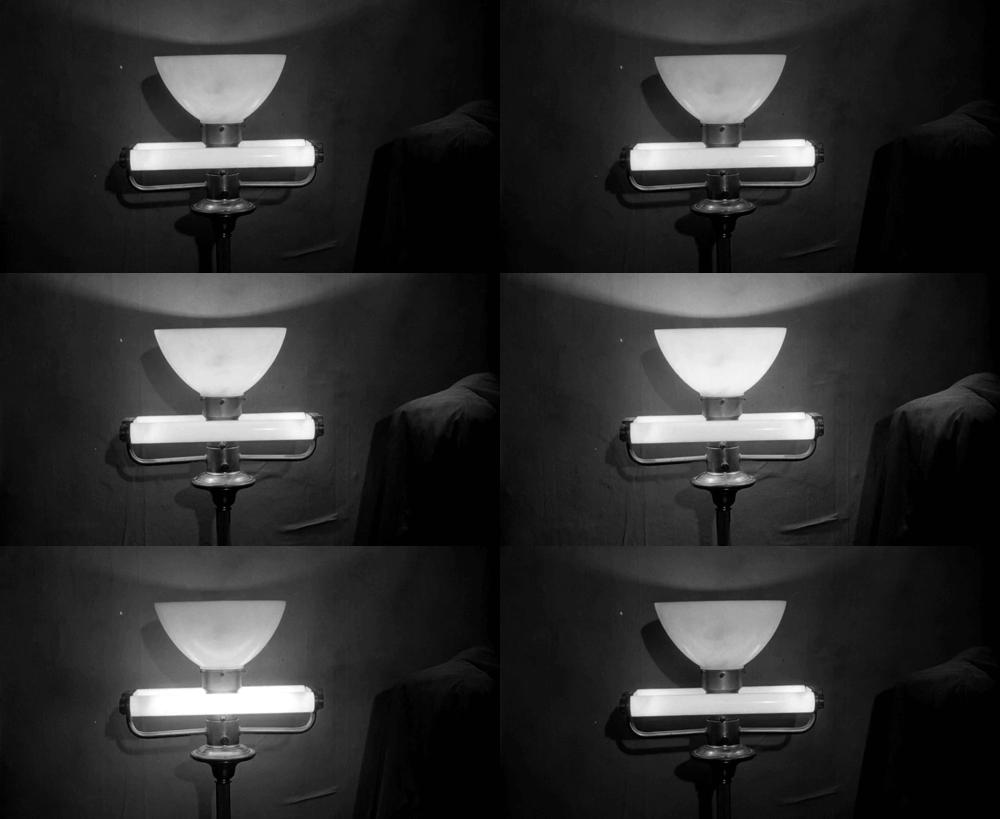
How'd You Do?

These images taken with my phone. Best case would be with a doc camera or screenshots.

Adaptations for YOU:

Honestly, GIF animation is much easier with the app I use, GifBoom, but I'm glad I've got several more options at my disposal.

Besides using this for steps of a math or science problem, you could use an animated GIF for...
  • slideshow of student work
  • lyrics to a song
  • parsing phrases and other grammar constructions
  • digital flipbook
  • comic strip


12 September 2011

More Reflection on the Flipped Classroom

Found an infographic today about the Flipped Classroom (or reverse instruction). I thought a lot through it last year in this post, and still wish I could make it a reality for my own classroom. Last year one of my problems was inequity among my students of internet access at home, which I'm perceiving is less of an issue this year. But, with three preps this year I feel like the load of online lecture creation is too heavy to really make it happen.

I have had a measure of success this year with Edmodo.com getting my kids logged on to ask me questions, share resources, and complete some assignments. The kids have gravitated to it much more than I expected. It largely replicates what I share on my class facebook page, so I thought kids would use that primarily to avoid having another website to login to, but perhaps the fact that its NOT facebook is the appeal.

Here's the infographic - check out the failure rate decreases cited toward the bottom.
The Flipped Classroom
Created by Knewton and Column Five Media

24 January 2011

Flipping the Classroom (Week 1)

(or,  to YouTube, or not to YouTube...  That is the question.)

The first thing I learned this week  is that that is probably a correlation between the quality and clarity of the materials I create/share online for my students and their likelihood of having those materials prepared when they get to class.

That brings me to the trouble of time. It seems ideal to create my own videos so I can control the content, elude to events from class, and point students to more resources, but to create a worthwhile video takes me at least an hour at this point after I am done filming/screencasting, editing, and uploading.  Creating my own content also makes burning to DVDs or CDs much easier, which is important for making a flipped classroom feasible for my students without web access.  This almost seems manageable for one course, but getting it done for two courses at the same time, right now, seems daunting.  My first solution is to compile playlists of the best videos, which is mostly what I did for last week.  When chosen thoughtfully, I think a playlist of others' videos is almost as good, and kind of has me feeling like I have a co-teacher.

But here's the dilemma.  Many students that don't have web access at home make the wise choice to use their lunch or other free time in the building to go to a lab and view course materials and check their online grades when they can.  My students could have viewed their notes from last week this way IF YouTube was not blocked for student accounts.  The advantage of YouTube is critical mass of content.  When a student views one of my videos or one I share, if he wants to see a different video, the largest library of related content is on YouTube.  There is related content on unblocked sites like Vimeo or TeacherTube, but just not as much.  Something I need to work out.

Assessment of Week 1:
We were off Monday for MLK Day as mentioned in the last post, and then had snow days on Thursday and Friday, so there's really not even enough experience to grade.  Informal early reports suggest that my older students were more likely to have accessed the content from home.
Things to Change for Week 2:
Not a whole lot to adjust yet because half of my content/lesson plan from last week is still on the table.  I did not call/email parents to let them know notes/videos were available, which I know should be one element of success, but that was partially because I was not totally pleased with what I was offering last week.  I already had an email attachment debacle a couple weeks ago during a snow day, so I did not want to lose some parents by pushing crap out to the masses.  However, I will...
  • email/call parents
  • focus on ONE of my courses to improve quality of content
  • put some videos on Vimeo (can those uploads be linked to YouTube?)

18 January 2011

Flipping My Classroom (Initial Thoughts)

Tomorrow's the big day!  Sort of.

As with when I jumped into trying to implement standards-based grading with little more than a day's preparation last January, tomorrow I begin my week-long pilot of flipping, reverse, backwards classroom.  I really like the idea of it, and watching videos here and here, and following @drezac was pretty motivating and they seem to make it work, but I know that I am going to run into some difficulties.  If I could, BRIEFLY, go through the ADDIE model to digest what lay before me, I will.

Analyze
What initially turned me on to the idea of "flipping" my classroom is that I felt like I was spending a lot of time covering examples and giving notes that my kids needed, but was severely lacking in helping my kids and coaching them along.  I built a "co-teacher" standard into my evaluations this semester to encourage the spirit some kids will inevitably foster of helping their peers and doubling my efforts, but I want to do more.  "The Rage" as we like to call it at North most often comes out toward me when the kids are just frustrated.  I hope to increase my one-on-one time with students and small groups of students.


Design/Develop
On Friday I gave all of my classes the heads up on my intentions for this week and informally polled the class on who did not have internet or a smartphone to potentially watch videos and only ran into a few that (admitted) to having a problem with those capabilities.  I actually expected for more of those situations from my experience last year, so I'd been racking my brain, colleagues, and PLN trying to come up with alternatives to online videos.  I KNOW that most everyone has a DVD player at home, so ideally for those students without internet I would burn DVDs for, and secondarily would put the files on a CD/DVD-ROM for kids to open the files on an offline computer.

Last week we had a snow day and I emailed all my parents and students about a video I had posted and I got at least 1/4 participation, so I'm optimistic about levels of participation at home and support from parents.


Implement
I started making my own videos for my two courses today.  The advantage to making my own is that I can make for certain that everything on there is concise and tailored to where I'm going, and also makes the content easily transferable to DVD.  The disadvantage, obviously, is that it takes a LOT more time than using someone else's video.  Another limitation for me at home is that in order to get clean audio, I need to either be away from my 1 yr old or she needs to be sleeping.  That was not an option for me today, so uploading my own to YouTube was awash.

The new challenge, for me then, is how will I get notes and instruction to my offline kids without having my own content to push to them?  For those that are online, I ended up making two playlists on YouTube for their respective subjects for the week and embedded the playlists on Edline, our district website server.


Evaluate
I'm a little disappointed about not exactly coming out on top of things on the preparation side, but that's more acceptable when adopting innovations for one class versus an entire organization.  There are fewer consequences to adoption on smaller scales.  I was pleased with coaching my students last week, and am pleased with my lesson plan for tomorrow to get things rolling.


I wonder what the other math teachers will think...  I DID get an endorsement from @aunthattie on my DVD burning idea.