Showing posts with label algebra. Show all posts

17 August 2023

How to: Import McGraw Hill eAssessment Assessments into your Canvas LMS

*This post was originally published in 2020 and updated in Aug 2023 to reflect a change in the click-flow on the McGraw-Hill platform*

This one is for my math homies in my school and out there in the #mtbos!

I've been teaching in Canvas for only a week, and I've already learned out two very important lessons: 

  1. Canvas has a LOT to offer as far as tools to deliver content to my students
  2. The more I keep my kids ON Canvas, the less confusing the flow of my class will be (which is super important for keeping you, kids, and parents all on the same page!)
So, as a part of my into-the-fire professional learning, I wanted to figure out very quickly if I could import assessments from our McGraw-Hill tools into Canvas to make building my curriculum muuuuuch easier. 

Here's how I did it:
  1. Create your assessment in eAssessment on the McGraw-Hill website
  2. Go to File --> Export --> QTI Standard --> QTI 2.1 and save the .zip file it creates.
  3. Go to File --> Export -->  QTI for Canvas --> New Quizzes and Item Banks (Updated since 2020 when I made this screencast!)
  4. Go to Canvas and click on the quizzes page or a module to create a new quiz. 
  5. Set the title and due date for your Canvas quiz
  6. Click on the 3 dots menu in the top right and choose "import content"
  7. Drag or navigate to the folder with your saved .zip file and upload.
  8. You're done! Go on over to the quiz settings and tweak how it best fits into your class.

03 March 2016

Real Math - My Son's Oat Milk

One of my boys has food allergies. A ton of them. So many that wife and I keep a list for OURSELVES posted in the kitchen. The latest and greatest food sensitivity seems to be to flax, which means my wife went looking for a replacement to his flax milk today. (Flax milk was already a replacement for coconut, which had replaced soy, which had replaced almond, which had replaced dairy. Tired yet?)

She tried using our Kitchen-Aid blender today, and got through the job, but it was quite under-powered for what she really needed, so we made the decision to buy one of those hardcore you-can-blend-an-iphone blenders.


When I got home from a meeting earlier, she asked me to do some math with her. Here was our conversation.


As we talked, I wrote down what she was saying, and put together 2 expressions to make a system.


Before I talk about Algebra, I just want to give her a shoutout for having AMAZING estimation skills, but really, check out those systems! I asked her if we could record before she asked me the real question, and I was HOPING, to get something worthwhile, but this is so cut and dry perfect it was like she set me up.
Next time your students ask about using systems in their lives, feel free to let them know about the little boy in Missouri and his mom making oat milk. :)

18 December 2014

Big Macs are NOT Commutative

I went to a St. Louis Blues game with a friend recently and the team scored 4 or more goals, so everyone with a ticket stub got a free McDonald's Big Mac the next day!

When I got my Big Mac back to the math office for lunch, I opened the carton to discover that on top of my sandwich was two consecutive pieces of bread. It looked a lot like this:

source: smosh.com
Besides relevance in assembling nearly anything, many creative processes, and computer programming, order of operations is even important in our branded food products. Who wants that much bread? :)

I showed it to my friend who had stayed behind and his reply was inspiring.
"Big Macs are NOT commutative."
This image will be posted in my classroom as a playful reminder to always be considerate of those operation rules.


16 December 2014

Algebra on a Chromebook: Coding with Bootstrap

Have you ever wanted to code in the classroom to integrate more STEM projects, but felt tied into making sure you hit all your required curriculum?


Bootstrap (www.bootstrapworld.org) is a complete curricular resource for math teachers who want to integrate coding into their algebra instruction and computer science teachers who want to integrate and support their students' math learning.  Students learn the logic and spatial reasoning necessary to translate into "real" coding languages while working with operations, functions, and the coordinate plane. It's a real two-for-one!

What Will I Find?
The Bootstrap website has everything you will need to implement the Bootstrap curriculum in your Algebra 1 class (except for the technology hardware, of course)
  1. Student workbook (and teacher edition)
  2. Unit pages for students to follow through and fill in their workbook
  3. WeScheme online coding environment (this is called an IDE, for "integrated development environment," which just means, "this is where you write the code for your website or webapp.")
  4. Alignment to common core standards
  5. Teacher notes (displayed on the same page students use to read instructional content)
  6. Professional development videos to help you understand coding-specific words or processes before you have to share with your class.
How Will My Students Do This on Their Chromebooks?
Some of the work in the Bootstrap units will take place in the online modules, some will be handwritten on paper or whiteboards, and some will be in an IDE like WeScheme (when kids are building their projects)

In other words, students will use their Chromebooks for viewing lesson content, collaborating, and writing their code. 

Why Should I Do This Instead of Focusing on Raising Tests Scores? Accreditation is Very Important for Us.
I believe this question can be answered with three more. How's your more traditional curriculum working for all of your student? Is everyone mastering the Algebra content? Are your students learning content for a test, or are you giving them a vision for something more?

In my personal experience, the number of students that come into my Algebra 1 class that are being successful in "normal" classes continues to fall. We still have students that can excel in those environments and can play the school game, but I see a growing divide between those and the others. Going through the laundry list of things our district is trying to target, the bootstrap curriculum gives me opportunity to still do plenty in reading technical content, writing for assessment and understanding, and providing engaging, relevant work.

How Else Could I Sell This to My Administrator and My Colleagues?
Here are some talking points that should cover most of your bases-
  • "The units are aligned to the common core."
  • "Students will have an end product to demonstrate their learning at the end of the semester."
  • "They provide a pre and post test to gather data on the curriculum's effectiveness."
  • "Coding is a highly relevant and marketable skill for getting our students college and career-ready."
  • "Feel free to come visit and ask my kids about their work at any time. :)"

Is the Bootstrap curriculum for everyone? Maybe not - if you have no interest in coding yourself, then I think you would have a hard time getting your students passionate about learning themselves. Some students are just as averse to "new" or "different" in education as your teaching colleagues, so you'll need to be sold on the idea yourself to get them on board. That's not to say you already need to know everything about coding. The teacher notes are very helpful, and I went from totally confused to amazed at the idea of "circles of evaluation" and how they can help increase my students' UNDERSTANDING of the process and necessity of order of operations.


23 October 2014

The PhotoMath App is Good, and History Says Its Here to Stay

In case you haven't heard about it yet, there is a new education app for iOS and Windows Phone devices called PhotoMath. Most basically, the app utilizes the camera on your device to recognize numbers and letters, runs an algorithm, and then displays a solution on the screen. From there you can follow the solution it generated step-by-step.

Here it is in action.

There are two ways to respond to the Photomath app, really. One is a reaction of fear, and the other one of promise.


This app is really cool,  people! The computational power behind pointing a camera at an equation or expression and having it solved or simplified step by step for me (nearly instantaneously) should really impress us, right? My hope is that the PhotoMath app and it's future iterations will be the disruption in math education we've been looking for. How much longer can classrooms ignore the technology and force students to solve everything by hand (and then stop there)?

Let's look at a brief (and roughly estimated) timeline of math technology in education:
  • 1970s: 
    • Computers are cool and all, but we mustn't let them replace the computational and arithmetic skills of our students. What if the technology goes away?
  • 1980s: 
    • Handheld calculators are cool, but we should only give them to students once they've learned their math facts anyway. What if the technology goes away?
  • 1990 and 2000s: 
    • Graphing calculators are a great tool, but students still need to know how to do it all by hand. What if the technology goes away?
  • 2010s: 
    • That's really impressive that you can make full color graphs on your smartphone/tablet, zoom in and out, change axis scales, and locate points of interest with a swipe and a pinch, but they can't use those on "the test," so they aren't worth the time.
    • Wolfram Alpha can solve equations for you? That's a really cool tool for college students to use as they explore upper-level mathematics. I hope my kids don't find that and cheat. Besides they need to know how to solve equations for "the test."
  • 2014: The PhotoMath app


What side of history will you be on?
As I noted in the timeline above, technology to solve our kids' equations on their homework has been in their hands or laptops via Wolfram Alpha or CAS graphing calculators for years already. The PhotoMath app makes it even easier to access that power, but I think your attitude toward Wolfram Alpha should mirror the opinion you ultimately take of PhotoMath. Will you embrace the technology and lead conversations and work to push for lessons and assessment in your school that expect more of students than x=_____, or will you wait for someone else to make that decision? I think history foreshadows that you'll be dealing with it eventually, anyway.

11 October 2014

2 Exercises for "Relevant" Proportion Solving in Algebra 1

One of the first things I realized after becoming a math teacher in my very first Algebra 1 summer school course was that students love to cross multiply. You stick a fraction on the board and ask something like, "Okay, what next," and you will most certainly get some kids that are dying to cross multiply.

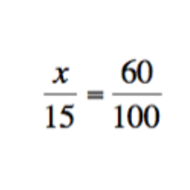
Kids that only know how to cross multiply love to get exercises like this:
And they're probably even pretty comfortable with this:


But things might start to fall apart sometimes when students have to set up the proportions themselves in a situation not neatly laid out for them in "word problem" format.

Here are two such attempts that I used in my Algebra 1 class this past week. One is about troop reduction in Afghanistan, and the other is about "total percentage of weight loss" and trying to win the reality show The Biggest Loser.


WAYS TO MODIFY THESE PROBLEMS:
  1. You could increase the rigor in both of these problems if you did not initially give either of the numbers I hand out (8000 and 51%, respectively) and instead, had your students figure out what number would be relevant to finding a solution that would satisfy the problem. After deciding what information was needed and/or relevant, students could do a web search to find the information for themselves. 
  2. Have an extension question exploring these ratios in a different way.
    1. The Afghanistan troop numbers could be compared to Iraq or previous deployments this century in Afghanistan.
    2. The Biggest Loser problem could ask students to compare Jerry to other seasons to see if he would have won those years. You could have students set up "teams" of Biggest Loser contestants and find the proportions of weight loss necessary to defeat other fantasy teams from previous Biggest Loser seasons.

24 January 2014

Strategies for Solving Linear Equations

Getting ALL of your students proficient at solving linear equations is the Holy Grail of any Algebra teacher. Just about every PLC team I've been on has attempted to re-tackle it as an (in-achievable?) SMART goal.

SMART goal setting season is upon us once again in these parts, and the early formative data from our Applied Math (after Geometry, before Algebra 2) students suggests that we MUST place an emphasis on solving equations with variables on both sides of the equation.

We're going to share the following strategies with our students:
Algebraic:
  • have students draw line through equal sign
  • distribute first to eliminate “( )”
  • combine like terms on left, combine like terms on right
  • eliminate the smaller coefficient term
  • backwards order of operations
  • write answer as “variable = number”
Verbal:
  • write out algebraic steps/thinking in words
With Multiple Fractions:
  • multiply every part by least common multiple of the denominator

Common enough, I know. What I'm really sharing with you is the posters I made to put up in our classroom. If you're going to do something you're feeling a little deja vu over, the least you can do is apply some of your creative juices to change your attitude. :) I made these images at PicMonkey using a combination of textures and text, and just used the Microsoft Picture Viewer on our PCs at school to print them on a full 8.5x11 sheet.