Showing posts with label clickers. Show all posts

21 October 2013

Socrative 2.0 - "Clicker" Platform Gets Better

I've been a huge fan of iOS/Android/web app Socrative to replace the clickers in my classroom since the first week I had iPads in my classroom (January 2011).

I've used it for exit tickets, bell-work, chapter reviews, guided practice during a lecture, reflection on learning, and even a semester final. My students have ALWAYS complained that if they made a mistake or wanted to skip around, there was no "go back" functionality within Socrative. As flashy and fun as the app is, I've always leaned heavier on Google Forms to give my students that flexibility.

I gave a presentation last week on replacing the Scantron with digital tools that give you richer, quicker feedback and allow you to assess more than multiple choice. I love Socrative as a tool to close what I called the "feedback gap," that time between when you give an assessment, grade it, and then pass it back. What I didn't know was that Socrative had a new version in beta that addressed the "go back" functionality that I mentioned above! You can access the beta version of Socrative 2.0 by both you and your students using beta.socrative.com

The U/I is fresh, but there's more here than that!
Rather than write anything more, I decided to run through Socrative 2.0 briefly and share some of the new teacher and student features.

This video screencasts:
Administering a saved quiz - choosing quiz, setting student paced
Student taking quiz, going back through work and editing responses (Socrative 1.0 did not allow editing or skipping around)
Student submitting response
Viewing specific student responses and results (Socrative 1.0 only showed a student's score)
Finishing the saved quiz and getting a report


I last wrote about Socrative soon after the "insert image" into a question function went public, and it was much needed, but I think I even more appreciate the new student pacing options in Socrative 2.0.

18 April 2013

Socrative + Desmos Calculator = Multimedia, Interactive, Easy Assessment


This came in my inbox today, so I figured it was safe to share this previously "secret" feature.

If you're new to Socrative, the web and app-based service is a formative assessment and survey tool that can be accessed via PC, Mac, or any web-enabled device. (Which comes in handy when the app gets glitchy some days and I can switch to the web). I wrote more about using Socrative to replace Scantrons if you want more info on practical application and a comparison to using Google Forms.

Math Assessment Writing Toolbox
  • Equations - Google Drive
  • Graphs - Desmos
  • Formatting - Socrative
Adding images and auto-grading short answer makes Socrative a powerful tool.

One of the previous shortcomings of Socrative was that any multimedia I wanted to use in assessing my students had to be via a worksheet, a different file, or on my SMARTboard. This visual disconnect resulted in errors for some students simply because the content was not adjacent to the question prompt.  Even including basic equations in the prompt was awkward because I had to write exponents with carrots (^) and rational numbers or expressions with a forward slash (/). There's still no equation editor, but now that you can embed images, you can take a screenshot from your favorite equation editing platform and insert it with the prompt (embedded images is how most equations show up on the internet anyway, so don't bemoan the work-around).

My Algebra 2 students have a short assessment on exponential functions tomorrow, so this seemed like an excellent opportunity to run Socrative through the paces and embed some beautiful exponential functions from everyone's favorite web-based graphing calculator, Desmos.


Here's a screencast of my workflow this afternoon:

I'd REALLY like to be able to add images to my MC responses, also, but overall, I'm very excited about these additions to Socrative. I don't know how they keep it free and rival many paid services, but I'm thankful!

30 November 2012

Value Above Replacement: Sabermetrics for EdTech

Have you seen the movie, read the book, or heard of Moneyball? Here's a quick primer if not - be sure to keep reading after the excitement of this trailer. :)


Billy Beane, real-life general manager of baseball's Oakland Athletics, was faced with a challenge I'm sure you recognize: get a ton of performance with what never seems like enough money. Knowing he was never going to get ahead (or feel satisfied) trying to make conventional, "sexy" decisions, Beane recruited a statistician to go behind what his scouts' eyes were seeing, and make his personnel decisions based on parameters, or metrics, that were going to provide the most improvement for the best price. Generally, this outlook in baseball is referred to as sabermetrics, and is first attributed to Bill James.
the specialized analysis of baseball through objective evidence, especially baseball statistics that measure in-game activity.
I very simply substitute "technology" for "baseball" and "learning" for "in-game activity" in the above definition from wikipedia and I have definition for the principles we should be following when we choose technology tools for purchase on any level, and when we plan our everyday lessons.
the specialized analysis of TECHNOLOGY through objective evidence, especially TECHNOLOGY STATISTICS that measure LEARNING.
I'll be the first to argue in favor of spending as much money as possible on district technology budgets, but only if an actionable research plan has been followed first. Bad money spent just takes away from sports, theatre, music, teacher salaries, etc.

My favorite sabermetrics stat is WAR - Wins Above Replacement. (Here's how Baseball Reference calculates) Basically, WAR aims to compare any baseball player on a team against what an "average" player at the position would do. How can we apply that to education technology? I don't have numbers for it yet, but using my new sabermetrics definition for technology, (and some intuition and reflection), I can compare any piece of technology against the "average" instructional tool or method.

Wet-erase overhead vs. SMARTboard
iPads vs. laptops vs. computer labs
Graphing calculators vs. Graphing software
Graphing calculators vs. graphing by hand
student clickers vs. paper response cards
students on whiteboard apps vs. small, physical whiteboards

The observations would be simple, the CHANGE or DECISIONS would be more difficult. If the technology method as you're applying has insignificant statistical difference between traditional methods, then you have 2 options:
  1. Transform the way you use the tool, get new data, compare again
  2. Pass on that tool and continue using the "old" method

Its usually fairly easy to justify purchase or use of technology, even if students are more successful. Our culture ingrains within us such a reverence of new technology that often the first impulse is not to question the technology, but rather, search for other factors. The students? The teacher? Hour of the day? Grade-level?

Could you commit to making anti-technology decisions in favor of future, more capable tools or un-flashy, proven methods? What's the VAR of that technology in your classroom?

14 October 2012

What Alton Brown Taught Me About Education Technology


No uni-taskers in this kitchen


In 2006, while trying to build our newlywed, grown-up skills, my wife and I watched a lot of Food Network, particularly Good Eats with Alton Brown. Alton has made a career for himself by sticking to one basic formula: keep a kitchen stocked with flexible, quality tools, and know why (scientifically) you're doing what you're doing in that recipe. In many episodes, there’ll be some preparation task that often is accomplish by a uni-tasker (something like a garlic press, avocado scooper or these), an educational segment featuring kitchen tools or the science behind the day’s dish, and always an emphasis on quality.

I think those same principles easily apply to the application of technology in schools for teachers AND students.  Choose quality, versatile tools, and make sure people know how and why to use them.

Quality

Alton Brown doesn’t want you wasting your time with kitchen appliances that are going to break, and food that is only filling. We owe it to our kids to always have the technology in their classrooms functioning. Teachers have enough to do with their plan time than troubleshoot devices and relearn/rework devices every other day.  Spending a little more money often means a better user experience/interface, better design, and fewer headaches in the end. The example in my building is between one set of Turning Technologies clickers we were piloting and sharing in the math department, and sets of iRespond clickers that were purchased for every classroom in the school district. (a HUGE capital investment). Ultimately, both models provided the same functionality (run in PowerPoints, get data of student responses), but the user (teachers and students) experience was so much better with the Turning Technology clickers, that most of our teachers left the iRespond in the storage room and continued sharing the others. I understand going lowest bidder on a product rolling out to hundreds of classrooms, but from my observations it was a waste, because no one wants to use them. This is also a reason you usually see Apple products in schools. I'm not an Apple fanboy by any means, but I've NEVER heard anyone tell me how much they hate their iMac/iPad/MacBook


Education:

How does yeast work? Why do I cook my syrup at that temp? Why blend instead of pulse? Answering these questions in Good Eats episodes, Alton equips his disciples of cooks with the know-how to use these ingredients correctly, and creatively. Using the software and hardware tools in any given classroom requires click-training to instruct on the “how” of the system, but also a ton of “why”. Most companies have resource and best practice sections on the support pages of their websites; they do their part. The problem is that I think schools and districts often rely on this alone, expecting that teachers will all run to those pages on their plan times (and secretly hoping on their free time) to learn, train, and reflect on their new technology. The wonder of the internet age is that anyone can learn anything. The weight of the internet age is that there is more to learn and more to process. How do we choose?

We could all use a little Alton Brown on our shoulder, reminding us of that website, introducing that use of Google Docs, or playing around with that magic app, so we don’t have to. Twitter has been helpful for me and other teachers to bridge that gap, but it still requires boatloads of time that I have less of.


No Uni-taskers:

So give teachers fewer things to learn! There are several reasons for keeping uni-taskers out of the kitchen. In the classroom, its important for technology in classrooms to be versatile in application to make it easier on budgets, professional development and clutter. I'm currently trying out a "formative instruction system" for my district that has a lot of cool functionality - integrates well with current software, easy for students to pick up, several different ways for the teacher and the student to use it. However, just the teacher device for driving the clicker questions and/or annotating costs about the same as an iPad, and they've developed an app to (somewhat) replicate the experience. So instead of training all of our teachers on setting up and using this new system, why not use the clickers already in the schools, buy the iPads, and buy a $20 app that does the same annotation.

A couple bad lower-tech examples:


Equation vest builder - They’re cheap enough, I guess, but aren’t most uni-taskers? Couldn’t this just be done with tape and paper/index cards? How often are these really going to come out of the storage tub?


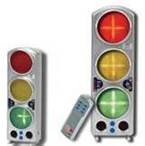
Noise Control Stoplights - The idea of these is helpful for students learning proper noise levels, but for the cost, it seems like a website or this free app always on the SMARTboard would be just as effective. (In my research, I came across this convincing article from Education World about the effectiveness of these lights, but I still think they’re not worth the price.)

Bottom Line:

Give a teacher a ton they can easily implement into the flow of their classroom, and guide them along the journey - they’ll thank you for it and use it. Give a teacher something else to try and figure out how to use - they’ll ignore you and continue using what already works for them.


12 October 2012

Guns Don't Kill, People Do (or... How It Should NEVER Be About the Device)

"Interesting how students really are involved when you throw a device in their hands."
I hear, read, or see something similar often from policy makers, parents, or teachers, or admin. Don't let them know, but I disagree. Not that technology and mobile devices aren't an iceberg of opportunity to enhance instruction, increase efficiency, and expand spheres of influence, but that the devices themselves bring it.

I feel like the entirety of my Master's program of study was an emphasis on that point. Computers don't help kids learn, teachers using software with clear directions, goals, and feedback do. Calculators don't help kids do math, teachers refining analytical minds do. Tablets, smartphones, clickers, and iPods don't inherently engage students in the lesson, a teacher that invites them to the learning and delivers content on the devices does.

If you're using (or investing) in classroom tech only b/c, "Kids get more engaged with a device" you're headed down an expensive road. Teenagers have short memories and fickle tastes - they'll be bored with the device itself before you're even done with the final stage of your implementation plan.

Devices come here, but YOU don't.
Think about it this way - think of the greatest lesson you've ever delivered. Think about the non-tech materials you used in the instructional plan. Was there a reading out of a book? Did students write together? When you were reflecting on how amazingly well that lesson went, and how much your students learned, did you praise the pencil? 
"I got some Ticonderogas from Target for my class, and man... those kids were so involved with their writing today."
Of course, not! High-yield instructional strategies will always be founded upon what the students are doing with the tools, not the mere existence of them.

New devices DO get kids' attention, and there is always a new level of excitement when we have some new tech toys out in class, but its all pointless if all your students got out of the day was, "We played on the iPads." The same way you can sit in front of the TV, or browse your Twitter/Facebook feed for hours "being productive," I often see a numbing effect on my students of "on-task" behavior being whittled down to not talking to anyone else or distracting others.

iPads, clickers, Smartboards, wireless tablets, and video equipment is exciting to have in the classroom, and I'm so blessed and thankful that I get to play with them so often and experiment, but the danger for me always in instructional planning is focusing too much on the tech and not enough on learning outcomes. I must take a moment to reflect on my lesson and analyze what my students need the tech for in that lesson, and what they'll be learning as a result (and communicating that expectation to the students as well.)

Agree, or disagree? What have you seen with your kids/students?


10 February 2010

Battling the Tech Learning Curve

Is it poorly designed tech that sometimes has a steep learning curve, or does it just depend on the skill?

Last year our school got our first set of student response clickers (ours are from Turning Technologies), and as a techie, I was very excited to give 'em a go.  My dept. chair and I sat for at least an hour one afternoon learning how to develop interactive slides integrated into PowerPoint and practicing the actual polling process.  There was certainly a learning curve, but we eventually figured it out and were hopeful at the promise of our new toy.  I never ended up checking the set out last school year, but several did, and student response was postitive.

This year during one of our district professional development days several of the math teachers had a chance to go to a session about using these clickers in the classroom for formative assessments.  They learned how to make slides, create session reports for easily entering students answers as graded assignments, and a few bells and whistles to boot.  I was busy leading my own session that day, so I missed out on the collaboration.

After finding Poll Everywhere through an #edtech tweet, I actually decided to ditch the district clickers and hold out for the day when my kids could just use their cell phones.  The reasons I liked Poll Everywhere were simple:
  • (with sacrificing some functionality) it's Free
  • The interface is pretty user friendly
  • No hardware to keep track of
  • No hardware issues to destroy my lesson
  • Possibilities for short-answer responses (Turning Technologies makes clickers that make this possible also, but we do not have this model.)
  • Students love using their cell phones anyway
But still, teachers were using those clickers, students were engaged, and I began to feel left out waiting for my day that is still a long time coming.  So last week I signed up for the clickers and sat down to create PowerPoint lesson with those interactive slides.  To my utter frustration, I'D FORGOTTEN EVERYTHING.  I left school that day after slaving at those slides for 45 minutes with nothing to show for it and dejectedly crossed my name off the clicker list for the next day.

What does it mean, then, if a teacher comfortable with tech (who has already once learned the basics of the software or hardware) gets frustrated enough with its implementation that even they give up?  Was I expecting too much to have a bicycle-type experience?  Or does Turning Technologies need to make its PowerPoint plug-in more intuitive?

Are there other tech toys or software that have given you a similar experience?