16 October 2012

Writing with Tech: Marzano "Chalk Talk" for Summarizing, Similarities and Differences

We've recently just finished solving systems of inequalities in my Algebra 2 class. Without really know what that means, its only important to know that there are many similarities between systems of inequalities and systems of equations in the manner with which you set them up to solve, and only a few distinct, but important, differences.

I knew several of my students felt like the inequalities was another example of the course seemingly doing something "new" every week or two, and I knew some of my students were really making the connection between the two, so I took a day to take advantage of the knowledge gap and practice some summarizing skills in small groups.

This activity was loosely based on what I thought I saw as a Marzano high-yield strategy called "Chalk Talk." I can no longer find any linked reference between "Marzano strategies" and "chalk talk," but here's a document that IS somewhat similar in explanation from The League of Professional Schools.

Lesson:

Day 3 of Solving Systems of Inequalities
This would have been Day 2, but I had not previously reviewed graphing linear inequalities yet in this course (where it was supposed to be in Chapter 2), so I tacked on a day here in Chapter 3 because I always felt like I was reteaching them anyway.

Do Now: (about 7 minutes)
Students came in, took out what was supposed to be their homework from the night before on systems of inequalities, and I played this video in which I'd worked out some solutions.
A couple of hours I just let the video play and allowed some talking amongst the kids about things they were noticing while I took care of administrative things, a couple hours I stopped it every once in awhile and had kids respond with what the next step would be.

Chalk Talk: (5 minutes)
Because this was the first time trying it out, I didn't want to invest too much technology-time getting the kids set up, so I did this step with Post-Its. Accomplishing this step with each group in a Google Doc would be simple as well.

There were two things I loved about this activity. I randomly distributed the group numbers around the room, forcing at least half of the class to move in order to sit with their numbers, and many students who had never worked together shared wonderfully together. It disappointed me that I hadn't switched them up sooner. Secondly, the last, summarizing step was a happy accident of scaffolding. Some of the groups basically regurgitated back a list of things they had all compiled, and some groups' writers spent several minutes writing wonderful paragraphs and being very thoughtful about using descriptive, math vocabulary.

Sharing and Conclusion: (10 minutes)
As the groups read, I put things I was hearing up on the SMARTboard.

You'll probably notice that a few things would up on both sides of the chart - a confusion I wasn't even aware of. It was helpful for me to see that and for the group that put it (incorrectly) on the similarities side to have the uh-oh moment after the other groups put it as a difference.

Tech Adaptations for YOU:

Charting the class list of similarities differences could have been done as a Google Doc, on the SMARTboard, with a document camera and a projector, or even just a whiteboard/big poster (but then the kids wouldn't be able to access later.)

A good conclusion activity for interactive notebooks/portfolios could be a reflective piece on how/why some things ended up on both sides, or something the student learned/strengthened as a result of seeing others' thoughts

This could serve as an introduction to systems of inequalities with a webquest, book reading assignment, or video completed prior to the post-it note silent writing time.


Tip Tuesday: 5 Effective Ways to Get the Homework Monkey Off Your Back

File this one in the "admittedly a smidge more work, but with a big payoff" category, readers.

I'm speculating here, but I'm guessing unless you teach at some super competitive private school or only have AP/Honors super students, you've got more than your share of homework hassles. So you've probably tried one, several, or all of these tactics:

  • smaller assignments
  • leaving books at home/class set in the room
  • only worksheets
  • no homework - only classwork
  • flipping the class - video note-taking at home, practice at school
I've found two things about the effectiveness of this strategies for my classroom - lots of students think they'll be effective, and none of them really ever are at motivating the homework-ne'er-doer to do his assignments. Haven't you heard some (all) of these?
"My book was in my locker and I had to catch the bus."
"I lost the worksheet."
"I had too much other homework to do."
"I didn't write down the page number."


Have I riled up enough frustration yet? :) Here's 5 strategies that I've found to legitimately give more of my students more opportunities to complete their practice (because sometimes they really do want to get it done but need opportunities that fit into super busy teen lifestyles)

1. Get a classroom social media account and tweet/share an update on the day and the page numbers for bookwork or any handouts.

I have a class Twitter account, Facebook page, and have previously used Edmodo. Different students like each one for different reasons, I guess, so I wish I could advise you to just pick one, but that would go against my experience. The best I can say is that you're safe with Twitter/Facebook, and you should use a third-party client like Hootsuite or TweetDeck to manage both networks simultaneously.

2. Use a Dropbox account to create a shared folder and give all of your students access to the folder. Drag any rubrics, worksheets, notes, or project outlines that you want to share with your students to the folder, save the stuff you want hidden in a different folder for that class.

3. Get a Google Voice number for students to text (to your email) whenever they get stuck on something. They're more likely to use it because they don't have to TALK to you, and its more convenient for you because you can fire off a response in between checking your friends' Facebook updates. You can also connect this number to the phone in your classroom - when parents use this number to call that line, you can send it to voicemail and then listen later while checking your email, at school OR at home. My students like this one a lot.

If your district is on Google Apps, this is especially convenient because they'll have automatic monitoring access. You can communicate knowing you're probably well within your district's policies. (But of course, you should still confirm that.)

4. Use a document camera to put up a shot on your projector or SMARTboard of the practice exercises or reading passage from the text book that students can quickly copy into their notebooks or snap a picture of with their mobile devices.

5. If your school has some form of a LMS (Learning Management System) in place, utilize it to post homework pages, notes, practice tests, or assignments. How often are you glad that companies and the government dump everything you need to know on the web? Can you imagine still limiting interaction with the DMV, IRS, shopping, or contacting your bank/utilities exclusively in person or by mail? Imagine now, that you've never known a world where the web wasn't the way we paid our bills, looked up information.

Extra Credit -
If you're feeling overwhelmed at the thought of converting everything you're currently doing by hand to  digital media that you have to put online and manage, have your students do it! Knowing that their notes will be seen by others will help your special helpers with summarizing and note-taking skills, and the students get more ownership of their classroom. I often hear kids say to each other, "Hey, text me that later," even without these procedures in place.


14 October 2012

What Alton Brown Taught Me About Education Technology


No uni-taskers in this kitchen


In 2006, while trying to build our newlywed, grown-up skills, my wife and I watched a lot of Food Network, particularly Good Eats with Alton Brown. Alton has made a career for himself by sticking to one basic formula: keep a kitchen stocked with flexible, quality tools, and know why (scientifically) you're doing what you're doing in that recipe. In many episodes, there’ll be some preparation task that often is accomplish by a uni-tasker (something like a garlic press, avocado scooper or these), an educational segment featuring kitchen tools or the science behind the day’s dish, and always an emphasis on quality.

I think those same principles easily apply to the application of technology in schools for teachers AND students.  Choose quality, versatile tools, and make sure people know how and why to use them.

Quality

Alton Brown doesn’t want you wasting your time with kitchen appliances that are going to break, and food that is only filling. We owe it to our kids to always have the technology in their classrooms functioning. Teachers have enough to do with their plan time than troubleshoot devices and relearn/rework devices every other day.  Spending a little more money often means a better user experience/interface, better design, and fewer headaches in the end. The example in my building is between one set of Turning Technologies clickers we were piloting and sharing in the math department, and sets of iRespond clickers that were purchased for every classroom in the school district. (a HUGE capital investment). Ultimately, both models provided the same functionality (run in PowerPoints, get data of student responses), but the user (teachers and students) experience was so much better with the Turning Technology clickers, that most of our teachers left the iRespond in the storage room and continued sharing the others. I understand going lowest bidder on a product rolling out to hundreds of classrooms, but from my observations it was a waste, because no one wants to use them. This is also a reason you usually see Apple products in schools. I'm not an Apple fanboy by any means, but I've NEVER heard anyone tell me how much they hate their iMac/iPad/MacBook


Education:

How does yeast work? Why do I cook my syrup at that temp? Why blend instead of pulse? Answering these questions in Good Eats episodes, Alton equips his disciples of cooks with the know-how to use these ingredients correctly, and creatively. Using the software and hardware tools in any given classroom requires click-training to instruct on the “how” of the system, but also a ton of “why”. Most companies have resource and best practice sections on the support pages of their websites; they do their part. The problem is that I think schools and districts often rely on this alone, expecting that teachers will all run to those pages on their plan times (and secretly hoping on their free time) to learn, train, and reflect on their new technology. The wonder of the internet age is that anyone can learn anything. The weight of the internet age is that there is more to learn and more to process. How do we choose?

We could all use a little Alton Brown on our shoulder, reminding us of that website, introducing that use of Google Docs, or playing around with that magic app, so we don’t have to. Twitter has been helpful for me and other teachers to bridge that gap, but it still requires boatloads of time that I have less of.


No Uni-taskers:

So give teachers fewer things to learn! There are several reasons for keeping uni-taskers out of the kitchen. In the classroom, its important for technology in classrooms to be versatile in application to make it easier on budgets, professional development and clutter. I'm currently trying out a "formative instruction system" for my district that has a lot of cool functionality - integrates well with current software, easy for students to pick up, several different ways for the teacher and the student to use it. However, just the teacher device for driving the clicker questions and/or annotating costs about the same as an iPad, and they've developed an app to (somewhat) replicate the experience. So instead of training all of our teachers on setting up and using this new system, why not use the clickers already in the schools, buy the iPads, and buy a $20 app that does the same annotation.

A couple bad lower-tech examples:


Equation vest builder - They’re cheap enough, I guess, but aren’t most uni-taskers? Couldn’t this just be done with tape and paper/index cards? How often are these really going to come out of the storage tub?


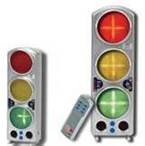
Noise Control Stoplights - The idea of these is helpful for students learning proper noise levels, but for the cost, it seems like a website or this free app always on the SMARTboard would be just as effective. (In my research, I came across this convincing article from Education World about the effectiveness of these lights, but I still think they’re not worth the price.)

Bottom Line:

Give a teacher a ton they can easily implement into the flow of their classroom, and guide them along the journey - they’ll thank you for it and use it. Give a teacher something else to try and figure out how to use - they’ll ignore you and continue using what already works for them.